Advanced Text to Speech Tool – Free Online TTS Converter (2025)
Convert any written text into natural-sounding speech with our Advanced Text to Speech Tool. This free online TTS converter lets you type or paste text and instantly listen to it using the voices already available on your device or browser. No signup, no installation, no hidden fees.
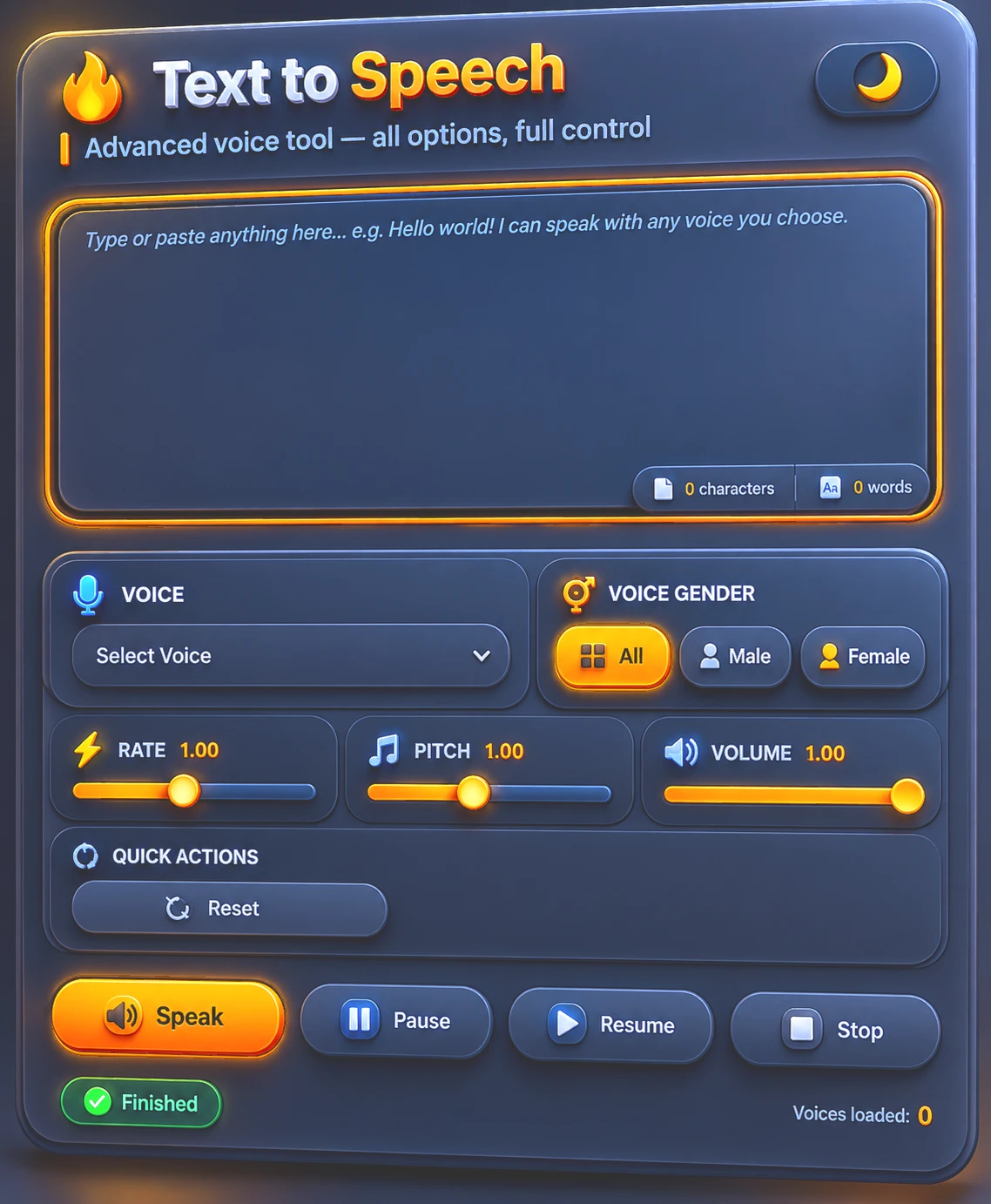
Whether you are a student, developer, teacher, content creator, or language learner — this tool gives you full control over voice, speed, pitch, and volume with a clean, mobile-friendly interface.
🔊 Try the Tool Now📑 Table of Contents
What Is a Text to Speech Tool?
A Text to Speech (TTS) tool converts written text into spoken audio using speech synthesis technology. Instead of reading a long paragraph manually, you type or paste it into the tool and let your device read it aloud.
This tool uses your browser's built-in Web Speech API (SpeechSynthesis) — which means the audio is generated locally on your device and is not uploaded to any server.
Key Features of This TTS Tool
1. 🗣️ Voice Selection
Choose from all voices installed on your device. Each voice shows its name, language, and type, so you can quickly find the right one.
2. ⚧️ Male / Female / All Voice Filter
Filter voices by gender for faster selection. The tool estimates gender from the voice name using a built-in keyword list.
3. ⚡ Speech Rate Control (0.5x – 2.0x)
Slow down for learning, or speed up for quick listening. The current value is displayed live next to the slider.
4. 🎵 Pitch Control (0.5 – 2.0)
Adjust the tone of the voice — deeper for narration, higher for a friendlier feel.
5. 🔊 Volume Control (0 – 1.0)
Control the speech output volume independently of your device volume.
6. ⏯️ Pause, Resume & Stop
Pause mid-sentence, resume from where you stopped, or cancel completely.
7. 📝 Live Character & Word Counter
Counts update automatically as you type — perfect for scripts and voice-overs.
8. 🌙 Dark & ☀️ Light Mode
Toggle themes with one click. Your preference is saved in browser local storage.
9. 📱 Fully Responsive Design
Works smoothly on desktop, laptop, tablet, and Android/iOS phones.
10. ↺ Reset to Defaults
One click restores: Rate = 1.00, Pitch = 1.00, Volume = 1.00, Gender = All.
How to Use the Text to Speech Tool
- Enter your text — type or paste into the text area.
- Select a voice from the dropdown.
- Choose gender — All / Male / Female.
- Adjust Rate — 0.5x (slow) to 2.0x (fast).
- Adjust Pitch — 0.5 to 2.0.
- Adjust Volume — 0 to 1.0.
- Click 🔊 Speak to start listening.
- Use ⏸️ Pause, ▶️ Resume, ⏹️ Stop to control playback.
🚀 Try the Advanced Text to Speech Tool
Enter your text below and click Speak:
🔥 Text to Speech
Who Can Use This TTS Tool?
| User | Use Case |
|---|---|
| 🎓 Students | Listen to notes and study material |
| ✍️ Writers | Proofread content by hearing it aloud |
| 🎬 Content Creators | Test scripts before recording |
| 💻 Developers | Test browser speech synthesis |
| 🌍 Language Learners | Practice pronunciation & listening |
| ♿ Accessibility Users | Listen instead of reading |
Technical Details
- HTML5 — semantic structure
- CSS3 — variables, flexbox, grid, responsive design
- Vanilla JavaScript — no framework needed
- Web Speech API — SpeechSynthesis & SpeechSynthesisUtterance
- LocalStorage — remembers theme preference
Limitations & Important Tips
- Voice availability varies — depends on OS, browser & installed language packs.
- Gender detection is approximate — based on voice name keywords.
- Long text may pause — some browsers (like Chrome) auto-cut speech after ~15 seconds. Use Pause → Resume as a workaround.
- Mobile browsers — iOS Safari limits voice selection; Android Chrome works best.
- Offline — works only if voices are installed locally.
- No MP3 download — browsers don't allow saving synthesized speech directly.
Frequently Asked Questions
Is this Text to Speech tool really free?
Yes. It uses your browser's built-in speech engine — no subscription, no account, no hidden charges.
Do I need to install anything?
No. Just open the page in a supported browser (Chrome, Edge, Safari, Firefox) and start using it.
Can I choose a male or female voice?
Yes. Use the All / Male / Female filter. If no matching voice is found, the tool automatically falls back to all available voices.
Why do I see different voices than my friend?
Voices are provided by your operating system and browser. Windows, macOS, Android, and iOS each have different voice sets.
Can I download the audio as MP3?
Not directly. Browsers restrict saving synthesized speech. For MP3 export you'd need a server-side TTS service.
Does it work offline?
Partially. If your device has offline voices installed, yes. Otherwise an internet connection may be needed.
Is my text private?
Yes — speech is generated locally by your browser. Avoid pasting sensitive data into any online tool as a general safety rule.
Final Thoughts
The Advanced Text to Speech Tool combines a simple interface with powerful controls — voice selection, gender filter, rate, pitch, volume, pause, resume, stop, live counters, dark mode, and responsive design.
It's a handy, free, browser-based TTS solution for students, developers, creators, and anyone who prefers listening over reading.
👉 Scroll up, enter your text, pick a voice, and click Speak to get started!